DBmarlin 6.5 Released - with better alerting and notifications
Smarter multi-severity alerting, per-rule notification profiles, AI-powered activity analysis, sensor status visibility, and a raft of infrastructure and usability improvements.
DBmarlin 6.5 is a substantial release with two major themes: making alerting more powerful and configurable, and pushing AI deeper into the day-to-day monitoring workflow. Alongside those headline changes there are several smaller improvements that make the product easier to operate. Here’s what’s new.
Smarter alerting
Alerting has been significantly reworked in this release, driven by feedback from teams running DBmarlin at scale across large database estates.
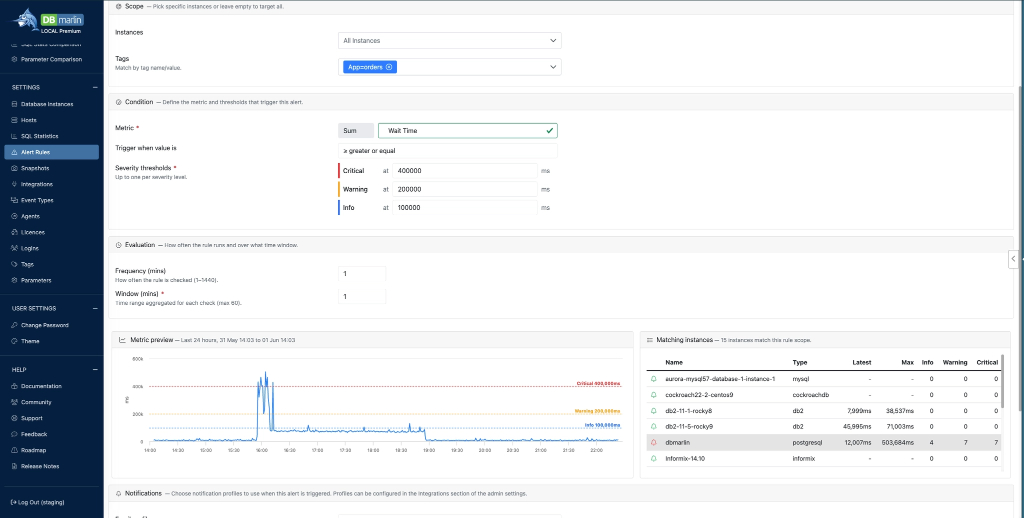
The most visible change is multiple severity levels. Alert rules can now have separate thresholds for Info, Warning, and Critical - so a single rule covers the full spectrum from “worth noting” to “wake someone up”. Previously you needed duplicate rules to achieve graduated responses; now it’s all in one place.
You can also control how often a rule is evaluated and the length of the evaluation window - both useful when you’re monitoring metrics that are naturally spiky versus ones that matter only when elevated over a sustained period.
Scoping rules to the right instances has also improved. You can now target multiple instances by multi-select or by tag, and separately scope rules to multiple hosts - making it straightforward to apply a single rule across an entire environment tier without duplicating configuration.
Finally, a new metric preview chart shows you how often the alert rule would have triggered historically, before you save it. This is a simple but high-value addition - it lets you tune thresholds against real data rather than guessing and waiting.
Per-rule notification profiles
Previously, each notification channel type (Email, Webhook, Slack, PagerDuty, ServiceNow) allowed exactly one configuration. In 6.5, you can define two or more profiles per channel type. For example, you might have separate email profiles for the DBA team and the on-call engineering rotation, and then choose the right profile on a per-rule basis. This gives teams much finer control over who gets notified and when, without routing everything through a single channel.
The Integration Settings screen has also been reorganised to reflect this - channels are now grouped by type: Alert notifications, APM integrations, and AI integrations - making it considerably easier to navigate as the number of integrations grows.
A new Test Now button lets you verify that each notification channel is working without having to trigger a real alert. If you’ve ever been caught out by a misconfigured webhook or a stale PagerDuty token during an incident, you’ll appreciate having this available at setup time.
Ask Co-pilot on the Activity screen
Clicking the Ask Co-pilot button sends everything currently visible - wait events, SQL, alerts, and change events for the selected time range - to AI Co-pilot for analysis.
The result is a natural-language summary of what happened during that period: trends, anomalies, likely causes, and suggested remediation steps. Rather than manually correlating spikes in wait events against SQL changes and deployment markers, you get a single synthesised view in seconds. This is particularly useful for post-incident reviews or for handing context to someone picking up an issue mid-investigation.
Blocking sessions: blocked time by session ID
The Blocking Sessions screen gains a new chart showing blocked time broken down by session ID. This makes it easier to identify which sessions are bearing the most cost from blocking - useful when you need to prioritise which locks to investigate first in a busy system.
Infrastructure updates
DBmarlin’s underlying stack has been updated to the latest versions of Tomcat, Nginx, PostgreSQL, TimeScaleDB, and Java, bringing security patches and performance improvements from each of those projects.
A new utilities script is also bundled under scripts/utilities. This pulls down the JDK tools - jmap, jstat, jcmd, jstack - which are useful for troubleshooting Tomcat when something goes wrong at the JVM level. Previously you’d need to track those down separately; now they’re available as part of the DBmarlin installation.
Getting 6.5
DBmarlin 6.5 is available now. Existing customers can upgrade through the standard update process. Check the documentation for upgrade notes specific to your deployment type.
👉 Upgrade today to get the latest features and improvements.
Check out the release notes for a full list of changes.